Build your own AI search visibility tracker for under $100/month

Tracking your brand’s visibility in AI-powered search is the new frontier of SEO. The tools built to do this are expensive, often starting at $300 to $500 per month and quickly rising from there. For many, that price is a nonstarter, especially when custom testing needs go beyond what off-the-shelf software can handle.
I faced this exact problem. I needed a specific tool, and it didn’t exist at a price I could afford, so I decided to build it myself. I’m not a developer. I spent a weekend talking to an AI agent in plain English, and the result was a working AI search visibility tracker that does exactly what I need.
Below is the guide I wish I’d had when I started: a step-by-step playbook for building your own custom tool, covering the technology, the process, what broke, and how to get it right faster.
The problem: A custom tool for a complex landscape
My goal was to automate an AI engine optimization (AEO) testing protocol. This wasn’t just about checking one or two models. To get a full picture of AI-driven brand visibility, I knew from the start that we had to track five distinct, critical surfaces:
- ChatGPT (via API): The most well-known conversational AI.
- Claude (via API): A major competitor with a different response style.
- Gemini (via API): Google’s direct, developer-facing model.
- Google AI Mode: Google’s AI search experience, which uses Gemini 3 for advanced reasoning and multimodal understanding.
- Google AI Overviews: The summary boxes that appear at the very top of the SERP for many queries, which by late 2025 were appearing in nearly 16% of all Google searches.
On top of that, I needed to score the results using a custom 5-point rubric: brand name inclusion, accuracy, correctness of pricing, actionability, and quality of citations. No existing SaaS tool offered this exact combination of surfaces and custom scoring. The only path forward was to build.
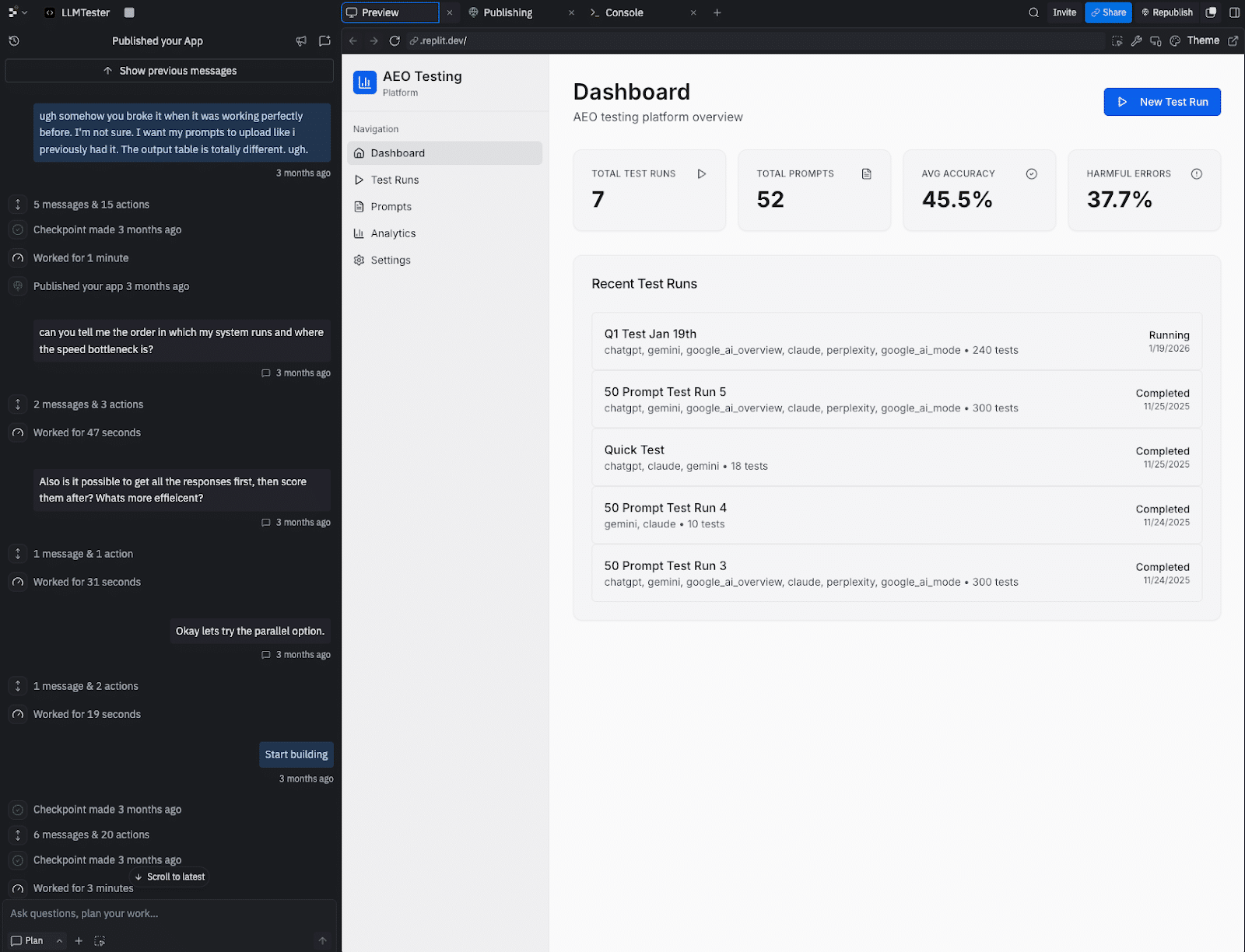
Here are a few screenshots of the internal tool as it stands. You can see some of my frustration in the agent chat window.


The method: Using vibe coding to build the tool
This project was built using vibe coding, a way of turning natural language instructions into a working application with an AI agent. You focus on the goal, the “vibe,” and the AI handles the complex code.
This isn’t a fringe concept. With 84% of developers now using AI coding tools and a quarter of Y Combinator’s Winter 2025 startups being built with 95% AI-generated code, this method has become a viable way for non-developers to create powerful internal tools.
Dig deeper: How vibe coding is changing search marketing workflows
The SEO toolkit you know, plus the AI visibility data you need.

Your tech stack: The three tools you’ll need
You can replicate this entire project with just three things, keeping your monthly cost under $100.
Replit Agent
This is a development environment that lives entirely in your web browser. Its AI agent lets you build and deploy applications just by describing what you want. You don’t need to install anything on your computer. The plan I used costs $20/month.
DataForSEO APIs
This was the backbone of the project. Their APIs let you pull data from all the different AI surfaces through a single, unified system.
You can get responses from models like ChatGPT and Claude, and pull the specific results from Google’s AI Mode and AI Overviews. It has pay-as-you-go pricing, so you only pay for what you use.

Direct LLM APIs (optional but recommended)
I also set up direct connections to the APIs for OpenAI (ChatGPT), Anthropic (Claude), and Google (Gemini). This was useful for double-checking results and debugging when something seemed off.
The playbook: A step-by-step guide to building your tool
Building with an AI agent is a partnership. The AI will only do what you ask, so your job is to be a clear and effective guide.
Here’s a repeatable framework that will help you avoid the biggest mistakes.
Step 1: Write a requirements document first
Before you even open Replit, create a simple text document that outlines exactly what you need. This is your blueprint. Include:
- The core problem you’re solving.
- Every feature you want (e.g., CSV upload, custom scoring, data export).
- The data you’ll put in, and the reports you want out.
- Any APIs you know you’ll need to connect to.
Start your conversation with the AI agent by uploading this document. It will serve as the foundation for the entire build.
Step 2: Ask the AI, ‘What am I missing?’
This is the most important step. After you provide your requirements, the AI has context. Now, ask it to find the blind spots. Use these exact questions:
- “What am I not accounting for in this plan?”
- “What technical issues should I know about?”
- “How should data be stored so my results don’t disappear?”
That last question is critical. I didn’t ask it, and I lost a whole batch of test results because the agent hadn’t built a database to save them.
Step 3: Build one feature at a time and test it
Don’t ask the AI to build everything at once. Give it one small task, like “build a screen where I can upload a CSV file of prompts.”
Once the agent says it’s done, test that single feature. Does it work? Great. Now move to the next one.
This incremental approach makes it much easier to find and fix problems.
Dig deeper: How to vibe-code an SEO tool without losing control of your LLM
Step 4: Point the agent to the documentation
When it’s time to connect to an API like DataForSEO, don’t assume the AI knows how it works. Find the API documentation page for what you’re trying to do, and give the URL directly to the agent.
A simple instruction like, “Read the documentation at this URL to implement the authentication,” will save you hours of frustration. My first attempt at connecting failed because the agent guessed the wrong method.
Step 5: Save working versions
Before you ask for a major new feature, save a copy of your project. In Replit, this is called “forking.” New features can sometimes break old ones.
I learned this when the agent was working on my results table, and it accidentally broke the CSV upload feature that had been working perfectly. Having a saved version makes it easy to go back and see what changed.
Dig deeper: Inspiring examples of responsible and realistic vibe coding for SEO
What will break: A field guide to common problems
Nearly everything will break at some point. That’s part of the process. Here are the most common issues I ran into, and the lessons I learned, so you can be prepared.
| Problem | The lesson and how to fix it |
|---|---|
| 1. API authentication fails | The agent will often try a generic method.
Fix: Give the agent the exact URL to the API’s authentication documentation. |
| 2. Results disappear | The agent may not build a database by default, storing data in temporary memory instead.
Fix: In your first step, ask the agent to include a database for persistent storage. |
| 3. API responses don’t show up | You might see data in your API provider’s dashboard, but it’s missing in your app. This is usually a parsing error.
Fix: Copy the raw JSON response from your API provider, and paste it into the chat. Say, “The app isn’t displaying this data. Find the error in the parsing logic.” |
| 4. Model responses are cut short | An LLM like Claude might suddenly start giving one-word answers. This often means the token limit was accidentally changed.
Fix: After any update, run a quick test on all your connected AI surfaces to ensure the basic parameters haven’t changed. |
| 5. API results don’t match the public version | ChatGPT’s public website provides web citations, but the API might not.
Fix: Realize that APIs often have different default settings. You may need to explicitly tell the agent to enable features like web search for the API call. |
| 6. Citation URLs are unusable | Gemini’s API returned long, encoded redirect links instead of the final source URLs.
Fix: Inspect the raw data. You may need to ask the agent to build a post-processing step, like a redirect resolver, to clean up the data. |
| 7. Your app isn’t updated | You build a great new feature, but it doesn’t seem to be working in the live app.
Fix: Understand the difference between your development environment and your production app. You need to explicitly “publish” or “deploy” your changes to make them live. |
The real costs: Is it worth it?
Building this tool saved me a significant amount of money. Here’s a simple cost comparison against a mid-tier SaaS tool.
| Item | DIY tool (My project) | SaaS alternative |
|---|---|---|
| Software subscription | ~$20/month (Replit) | $500/month |
| API usage | ~$60/month (variable) | Included |
| Total monthly cost | ~$80/month | $500/month |
The biggest cost is your time. I spent a weekend and several evenings building the first version. However, I now have an asset that I can modify and reuse for any client without my costs increasing.
The hidden costs are real: there’s no customer support, and you are responsible for maintenance. But for many, the savings and customization are worth it.
Dig deeper: AI agents in SEO: A practical workflow walkthrough
Track, optimize, and win in Google and AI search from one platform.
Should you build your own tool?
This approach isn’t for everyone. Here’s a simple guide to help you decide.
Build your own if:
- You need a custom testing method that no SaaS tool offers.
- You want a white-labeled tool for your agency.
- Your budget is tight, but you have the time to invest in the process.
Stick with a SaaS tool if:
- Your time is more valuable than the monthly subscription fee.
- You need enterprise-level security and dedicated support.
- Standard, off-the-shelf features are good enough for your needs.
For many SEOs, the answer is clear. The ability to build a tool that works exactly the way you do, for less than $100 a month, is a game-changer.
The process will be frustrating at times, but you will end up with something that gives you a unique advantage. The era of the practitioner-developer is here. It’s time to start building.
